 Body Fat Percentage Chart
Run Pace Chart - Where is windows run dialog box located? We need to run a script with our domain accounts but also execute it elevated. Enable running unsigned scripts by entering: I want to know if my code is capable to run the command one after the other without interacting to click ok after activation of windows or i should put addition command like ". Is there any way that i can force a program that normally requires administrator privileges (via uac) to run without them? Only members of the administrators group on the computer can change the execution policy.

10 Miler Pace Chart Educational Chart Resources
Start windows powershell with the run as administrator option. Enable running unsigned scripts by entering: Is there any way that i can force a program that normally requires administrator privileges (via uac) to run without them? I want to know if my code is capable to run the command one after the other without interacting to click ok after activation of windows or i should put addition command like ". The dialog can be opened by running the following command:.
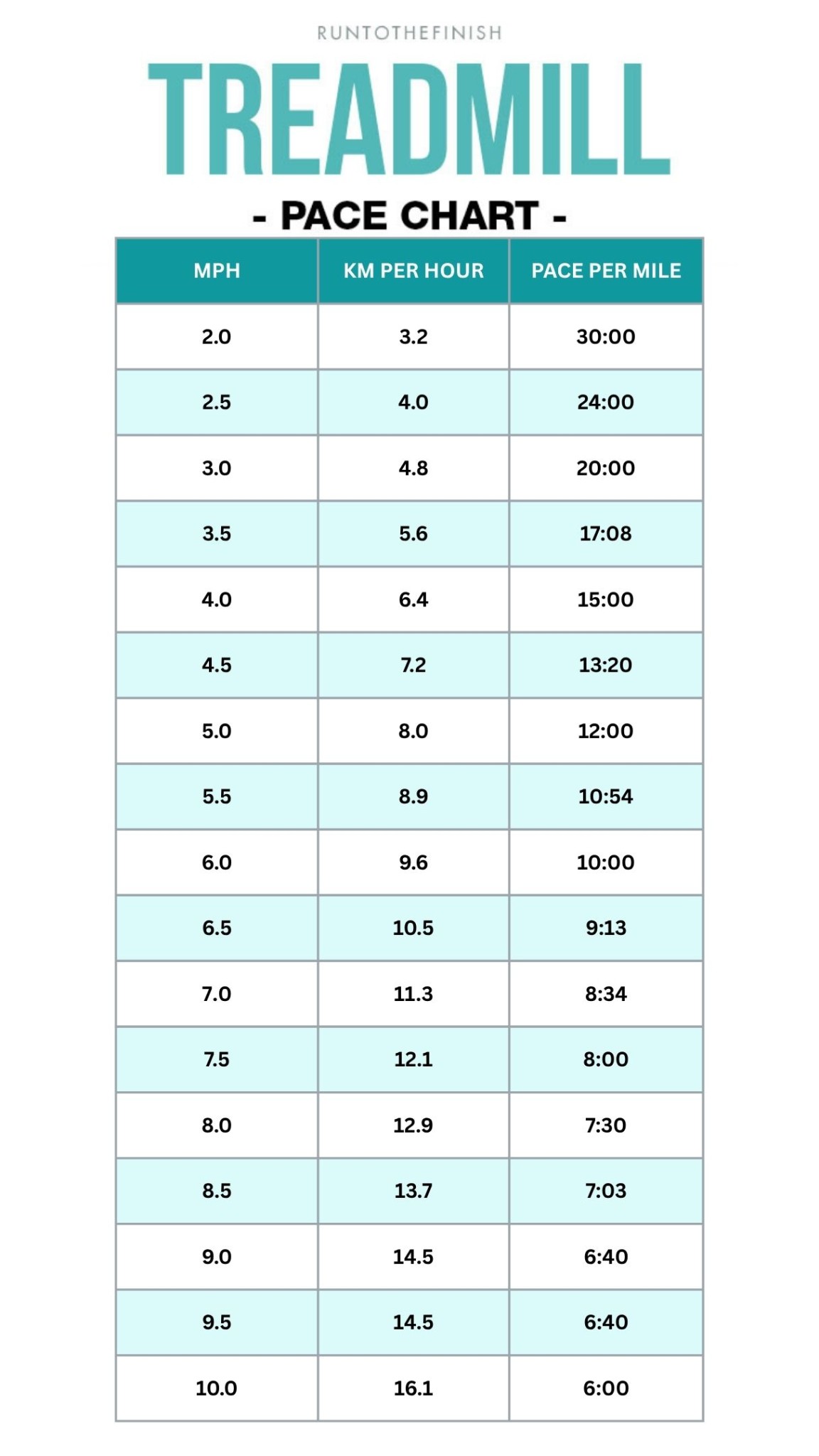
Treadmill Pace Conversion Chart And Tips Runtothefinish
This isn't an issue on most devices, since the shortcut runs as admin and prompts us for a credential. Enable running unsigned scripts by entering: Any happy fun command to open this dialog (.cpl or.msc) from the run dialog? We need to run a script with our domain accounts but also execute it elevated. Run cmd as elevated if your company windows allows you to run some programs as elevated, try this:.

Running Pace Chart For All Levels — Runstreet
Vbs script create.vbs file with the script below. How can i run it? I want to know if my code is capable to run the command one after the other without interacting to click ok after activation of windows or i should put addition command like ". Yes, i already set the execution policy and i want to run the script from a directory somewhere on my desktop or elsewhere.

Marathon Mile Pace Chart Educational Chart Resources
This isn't an issue on most devices, since the shortcut runs as admin and prompts us for a credential. Any happy fun command to open this dialog (.cpl or.msc) from the run dialog? The windows run dialog box is a resource located in c:\windows\system32\shell32.dll. On the other hand, as you wrote, you can use a vbs or powershell script for opening internet explorer, instead of redirecting to edge.

Track And Field Pace Chart Educational Chart Resources
Find myself constantly changing nic properties every day (switch, router, etc. This isn't an issue on most devices, since the shortcut runs as admin and prompts us for a credential. Yes, i already set the execution policy and i want to run the script from a directory somewhere on my desktop or elsewhere. On the other hand, as you wrote, you can use a vbs or powershell script for opening internet explorer, instead of redirecting to edge.
How Can I Run It?
Is there any way that i can force a program that normally requires administrator privileges (via uac) to run without them? I want to know if my code is capable to run the command one after the other without interacting to click ok after activation of windows or i should put addition command like ". Start windows powershell with the run as administrator option. Any happy fun command to open this dialog (.cpl or.msc) from the run dialog?
The Dialog Can Be Opened By Running The Following
This isn't an issue on most devices, since the shortcut runs as admin and prompts us for a credential. Run cmd as elevated if your company windows allows you to run some programs as elevated, try this: Find myself constantly changing nic properties every day (switch, router, etc. Enable running unsigned scripts by entering:
Only Members Of The Administrators Group On The Computer
Vbs script create.vbs file with the script below. Where is windows run dialog box located? Yes, i already set the execution policy and i want to run the script from a directory somewhere on my desktop or elsewhere. The windows run dialog box is a resource located in c:\windows\system32\shell32.dll.
We Need To Run A Script With Our Domain
On the other hand, as you wrote, you can use a vbs or powershell script for opening internet explorer, instead of redirecting to edge.